
GST Bill Format in Excel – Why Getting It Right Matters
Many Indian freelancers, traders, manufacturers, wholesalers, and service providers still create GST invoices manually using Excel sheets, Word documents, or handwritten bill books. While these methods may seem simple, even a small mistake in a GST bill can create compliance issues, tax mismatches, and Input Tax Credit (ITC) rejection for customers.
One of the most common examples involves interstate transactions where businesses mistakenly apply CGST and SGST instead of IGST.
A Real GST Billing Mistake
A retailer in Nagpur supplied goods to a customer in Delhi. The invoice was prepared manually in a printed bill book. Although all product details were correctly mentioned, the seller charged CGST and SGST instead of IGST.
Since the supplier and buyer were located in different states, GST law required IGST to be charged.
The mistake resulted in:
- ITC claim rejection for the buyer
- GST return reconciliation issues
- Additional compliance work
- Multiple corrections and revised documentation
- Strained business relations
This type of error is surprisingly common among small businesses and can easily be avoided by using a properly designed GST bill format in Excel with automated formulas.
What is a GST Bill Format?
A GST Bill Format is a structured invoice template that complies with the requirements prescribed under Rule 46 of the CGST Rules, 2017.
It serves as an official record of a taxable supply and contains all mandatory information required under GST regulations.
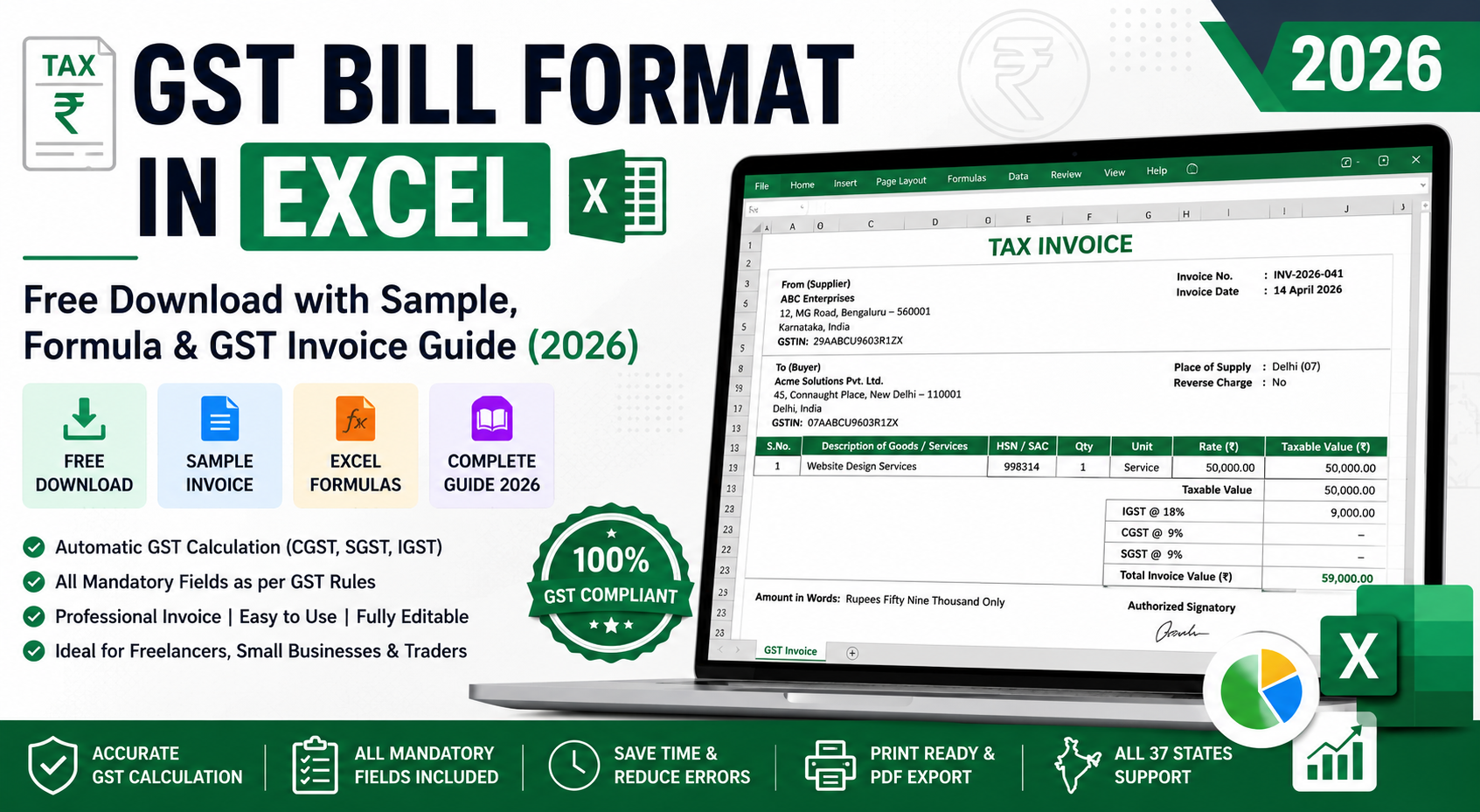
GST Bill Format in Excel
Download Free GST Bill Format with Ready-to-Use Excel Formulas, Auto GST Calculation (CGST, SGST & IGST), Professional Invoice Layout, and GST-Compliant Fields.
Free Forever • No Registration Required • Instant Access • Excel Editable Format
A GST invoice helps:
- Record sales transactions
- Calculate GST accurately
- Enable Input Tax Credit (ITC)
- Maintain accounting records
- Ensure GST compliance
- Support audit and tax assessments
Whether you create invoices using:
- GST Bill Format in Excel
- GST Invoice Format in Word
- GST Bill Format PDF
- GST Billing Software
- Online GST Invoice Generator
the mandatory fields remain the same.
Legal Basis of GST Invoice Format
Under Rule 46 of the Central Goods and Services Tax (CGST) Rules, every registered taxpayer issuing a tax invoice must include specific information.
Failure to include mandatory details may result in:
- Invalid invoice status
- Denial of Input Tax Credit
- GST notice during audits
- Return filing mismatches
Mandatory Fields in GST Bill Format
The following information must be included in every GST tax invoice.
| S.No. | Mandatory Field | Example |
|---|---|---|
| 1 | Invoice Title | TAX INVOICE |
| 2 | Supplier Name & Address | ABC Enterprises, Mumbai |
| 3 | GSTIN of Supplier | 27ABCDE1234F1Z5 |
| 4 | Invoice Number | INV-2026-001 |
| 5 | Invoice Date | 15 April 2026 |
| 6 | Buyer Name & Address | XYZ Traders, Delhi |
| 7 | Buyer GSTIN | 07ABCDE1234F1Z5 |
| 8 | Place of Supply | Delhi (07) |
| 9 | HSN/SAC Code | 998314 |
| 10 | Description | Consulting Services |
| 11 | Quantity | 1 |
| 12 | Unit Rate | Rs 50,000 |
| 13 | Taxable Value | Rs 50,000 |
| 14 | GST Rate & Amount | IGST 18% |
| 15 | Total Invoice Value | Rs 59,000 |
| 16 | Reverse Charge Indicator | No |
| 17 | Signature/Authorized Signatory | Required |
GST Bill Format in Excel – Why Businesses Prefer It
Excel remains one of the most popular GST billing solutions among small businesses because it is:
- Easy to use
- Cost-effective
- Customizable
- Available offline
- Suitable for low invoice volumes
A GST invoice format in Excel can automatically calculate:
- Taxable value
- CGST
- SGST
- IGST
- Grand total
- Balance amount
This reduces manual calculation errors significantly.
GST Invoice Format Excel Formula Examples
A good GST Excel template should include built-in formulas.
Calculate Taxable Value
=Quantity*Rate
Example:
=2*5000
Result:
Rs 10,000
Calculate CGST
=Taxable_Value*9%
Example:
=10000*9%
Result:
Rs 900
Calculate SGST
=Taxable_Value*9%
Result:
Rs 900
Calculate IGST
=Taxable_Value*18%
Example:
=10000*18%
Result:
Rs 1,800
Calculate Invoice Total
=Taxable_Value+GST_Amount
Example:
=10000+1800
Result:
Rs 11,800
GST Bill Format in Excel Sample
Supplier Details
Business Name: ABC Enterprises
GSTIN: 27ABCDE1234F1Z5
Address: Mumbai, Maharashtra
Buyer Details
Business Name: XYZ Traders
GSTIN: 07ABCDE1234F1Z5
Address: New Delhi
Invoice Details
Invoice No: INV-2026-001
Date: 15 April 2026
Place of Supply: Delhi
| Description | Qty | Rate | Taxable Value |
|---|---|---|---|
| Product A | 10 | Rs 1,000 | Rs 10,000 |
Tax Calculation
Taxable Value: Rs 10,000
IGST @18%: Rs 1,800
Total Invoice Value: Rs 11,800
Amount in Words: Rupees Eleven Thousand Eight Hundred Only
CGST, SGST and IGST Explained
Understanding which tax to charge is one of the most important parts of GST billing.
Intrastate Supply
When supplier and buyer belong to the same state:
GST is divided into:
- CGST
- SGST
Example
Seller: Maharashtra
Buyer: Maharashtra
GST Rate: 18%
Calculation:
- CGST = 9%
- SGST = 9%
Interstate Supply
When supplier and buyer belong to different states:
GST is charged as:
- IGST
Example
Seller: Karnataka
Buyer: Delhi
GST Rate: 18%
Calculation:
- IGST = 18%
No CGST or SGST applies.
Advantages of Using GST Invoice Format in Excel
Automatic Calculations
Reduces human errors.
Professional Presentation
Invoices look clean and organized.
Faster Billing
Generate invoices within minutes.
Easy Record Keeping
Maintain invoice history digitally.
Custom Branding
Add logo, company details and terms.
Printable Format
Can be converted into PDF instantly.
GST Bill Format in Excel vs Word vs PDF
| Feature | Excel | Word | |
|---|---|---|---|
| Auto Calculation | Yes | No | No |
| Editable | Yes | Yes | No |
| Error Risk | Medium | High | Low |
| Professional Look | High | Medium | High |
| GST Compliance | Easy | Manual | Fixed |
| Suitable for Daily Billing | Yes | No | No |
Common GST Invoice Mistakes to Avoid
1. Wrong GST Type
Charging CGST+SGST instead of IGST is among the most frequent GST errors.
2. Missing Place of Supply
Without this field, GST treatment may become unclear.
3. Incorrect GSTIN
A single digit mistake can prevent the buyer from claiming ITC.
4. Wrong HSN or SAC Code
Incorrect classification can lead to audit objections.
5. Non-Sequential Invoice Numbers
GST law requires unique and sequential invoice numbering.
Example:
Correct:
- INV-001
- INV-002
- INV-003
Incorrect:
- INV-001
- INV-005
- INV-010
6. Incorrect Tax Calculation
Manual calculations frequently result in:
- Wrong GST amount
- Wrong total
- Return mismatches
Excel formulas help eliminate this issue.
HSN and SAC Code Requirements in 2026
Businesses must mention HSN or SAC codes on GST invoices according to turnover limits prescribed under GST regulations.
Using the correct HSN/SAC code helps:
- Proper tax classification
- Accurate GST return filing
- Faster audits
- Easier ITC verification
Always verify the latest HSN requirements applicable to your turnover category.
GST E-Invoicing Update for 2026
Businesses falling under the government's notified turnover thresholds must comply with e-invoicing requirements.
E-invoicing involves:
- Invoice Registration Number (IRN)
- QR Code generation
- Registration through the Invoice Registration Portal (IRP)
For eligible taxpayers, invoices issued without a valid IRN may not be considered compliant for B2B transactions.
Businesses should regularly verify current e-invoice applicability thresholds as notified by GST authorities.
Benefits of Digital GST Billing
Modern GST billing systems offer:
- Faster invoice generation
- Automated tax calculation
- Reduced compliance risk
- Professional PDF invoices
- Better customer trust
- Easier GST return preparation
Compared to handwritten bill books, digital invoices are easier to maintain and audit.
Frequently Asked Questions (FAQs)
Is GST Bill Format in Excel Legal?
Yes. GST law does not mandate specific software. Excel invoices are valid if all mandatory fields are present.
Can I Convert GST Excel Invoice to PDF?
Yes. Most businesses create invoices in Excel and export them as PDF before sending them to customers.
Is Buyer GSTIN Mandatory?
Yes, for registered recipients. For unregistered customers, GSTIN is not required.
What Happens if GSTIN is Wrong?
The recipient may not be able to claim Input Tax Credit.
Can I Use Handwritten GST Bills?
Yes. Handwritten invoices are legally valid if all mandatory details are correctly mentioned.
A properly designed GST Bill Format in Excel helps businesses create accurate, professional, and GST-compliant invoices without investing in expensive accounting software.
Whether you are a freelancer, consultant, trader, wholesaler, manufacturer, retailer, or service provider, using a structured GST invoice format with formulas can significantly reduce billing errors and improve compliance.
Before issuing any invoice, always verify:
- GSTIN
- Place of Supply
- HSN/SAC Code
- Tax Type (CGST/SGST or IGST)
- Invoice Number Sequence
- GST Calculation
A well-prepared GST invoice not only ensures compliance but also builds trust with customers and simplifies GST return filing.